How to See Who Unfollowed You on Instagram
Key takeaways
- Two exports of one list are not the same people. Three runs of the same 548-follower account returned 435, 464 and 464 rows. The two 464s were not the same 464 people, and nothing had changed between them.
- A partial export pollutes both answers. People missing from the newer list look like unfollows. People missing from the older one look like new followers. Both are wrong, but only one accuses a specific person of dropping you.
- This is why trackers name innocent people. If a tool compares two incomplete snapshots and reports the difference, it will hand you usernames of people who are still following you. The tool isn't broken; the input was never complete.
- A third snapshot is real evidence. If someone who vanished from your newest export turns up in a later one, they never left — that export just missed them. One extra checkpoint settles it.
- Match on user ID, never username. People rename accounts. Compare on usernames and a rename reads as one person leaving and a stranger arriving, on the same day.
Three exports of the same 548-follower account, run close together, returned 435, 464 and 464 rows. The two that returned 464 were not the same 464 people.
Nothing had changed on that account between the runs. Nobody followed, nobody left. If you had compared those two exports the way an unfollower tracker does — subtract the new list from the old one, print what's missing — you would have been handed a list of "unfollowers" and a list of "new followers", and every single name on both lists would have been wrong.
That is the whole problem with this question, and almost nothing written about it says so.
Why "who unfollowed me" is harder than it looks
Instagram never returns a complete follower list in one pass, through any method, including its own interface. Each attempt returns an overlapping but different subset — the full measurement is here, but the short version is that the gap is real, it's usually somewhere around 10–15%, and which accounts get missed changes from run to run rather than being a fixed subset.
Now put two of those lists side by side and ask what changed:
- Someone in the old list, missing from the new one → reported as unfollowed you
- Someone in the new list, missing from the old one → reported as newly followed you
Neither of those inferences survives an incomplete input. A person the newer export simply failed to collect is indistinguishable, in the output, from a person who actually left. Both buckets get polluted — but only one of them puts a real person's username under a heading that says they dropped you.
This isn't a hypothetical failure mode. A ListLift user reported it directly: some accounts were left uncollected on every run, which meant the comparison kept flagging people as newly followed or unfollowed who had done neither.
Why every tool in this category has the same problem
It's tempting to read the above as one tool being sloppier than another. It isn't. Any product answering this question — a background tracker app, a web tool, an extension, a manual spreadsheet diff — is working from the same incomplete source data, because the incompleteness happens on Instagram's side before any tool sees a single row.
So the thing that separates a trustworthy answer from a confident-sounding wrong one isn't who scrapes faster. It's whether the tool checks how complete its inputs were before it starts naming people.
A tracker that holds continuous access to your account doesn't escape this either. Watching more often means more snapshots, but if each snapshot is missing a random 13%, watching more often mostly produces more false alerts, faster.
What actually makes the answer trustworthy
Three things, in order of how much they matter:
1. Make each checkpoint as complete as you can. A single export is a partial slice; several merged together are much closer to the real list. Combining three or four runs of the same list recovers most of the gap — on the 548-follower account above, three incomplete exports covered 523 unique people against 464 for the best single run. How merging works.
2. Keep your old exports. Two checkpoints can only ever tell you they disagree. A third one can tell you which of them was wrong: if someone who vanished from your newest export shows up again in an export taken after it, they never left — the export in the middle just missed them.
3. Match on user ID. Usernames change. Compare two lists on username and every rename in between looks like one person leaving and an unfamiliar one arriving. The numeric ID doesn't change, so it's the only safe key.
How ListLift handles it
The New followers tab compares two of your exports of the same list — either from your saved history or CSVs you upload — and splits the result into who's new, who's gone, and who's unchanged:
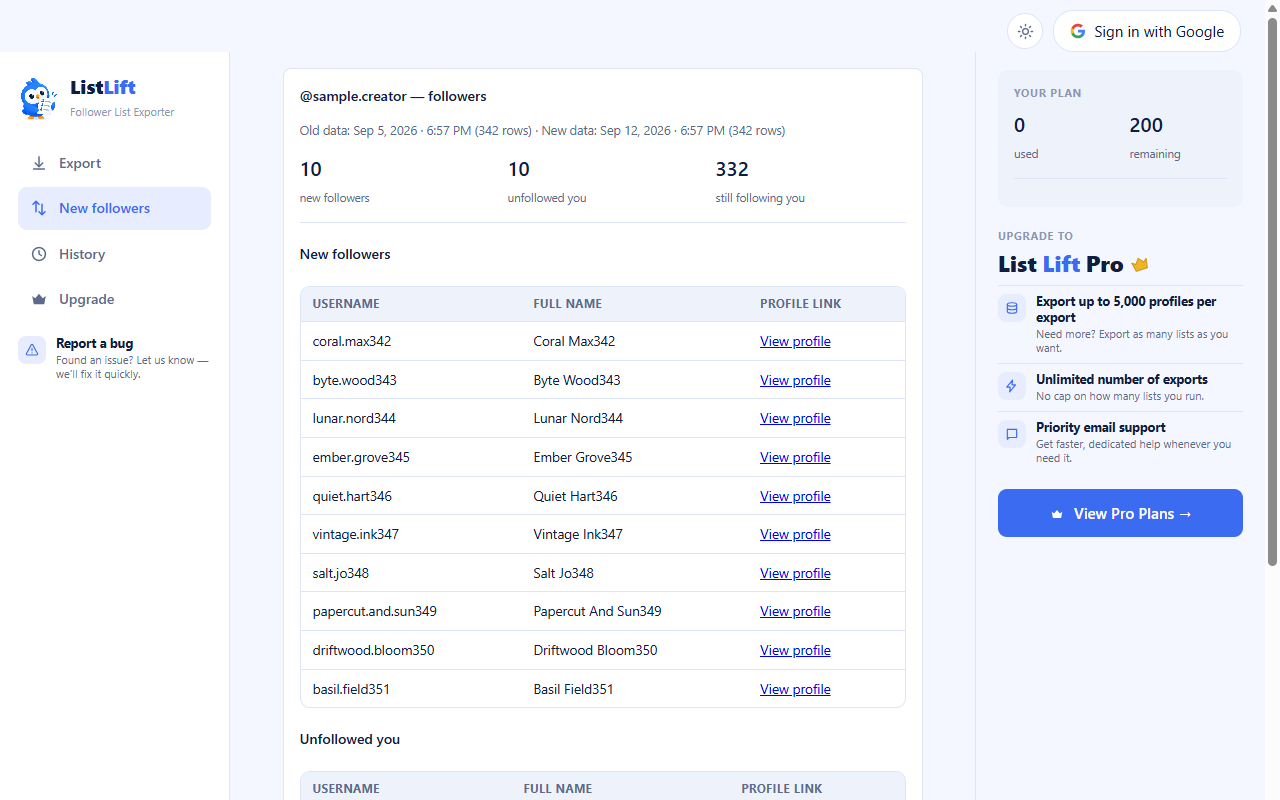
Two things happen underneath that screen that matter for accuracy.
First, it cross-references every other export you've saved for that profile, not just the two you picked. If someone shows as gone from your newer export but appears in an export dated after it, they're quietly reclassified as still-following rather than reported as an unfollow — and the result line tells you how many entries were ruled out that way. It can only remove false results, never invent a change that the two exports didn't show.
Second, it holds a stricter completeness bar for comparison than for exporting. An export can be finished and still be worth using on its own; a comparison built on it needs more than that. If either side collected noticeably less than the profile's own reported count, the result carries a warning saying the comparison may show people as new or gone who never changed — rather than presenting a clean number it hasn't earned.
What it still can't tell you
An unfollow and a deactivation look identical from the outside. Someone who deleted their account, got banned, or went private in a way that removes them from your list disappears exactly the way an unfollower does, and no tool can separate those cases, because the distinguishing information isn't sent to anyone.
You also can't get the moment it happened. Instagram doesn't attach a timestamp to anyone else's follow, so the space between your two checkpoints is your resolution — weekly exports answer "who left this week", not "who left on Tuesday afternoon". That's a real limit, and any tool promising the precise moment is inferring it from something it can't actually see.
What you can have is an accurate answer to the question most people were really asking: of the people who were following me last time I checked, who isn't now — with the false names already filtered out.
Questions this comes up with
Skip the manual work — use ListLift
The Instagram follower export tool that shows the real count before you export.